Navigating Japan’s extensive public transportation system can seem daunting at first glance. However, there’s one tool that simplifies it dramatically: the IC card. These rechargeable smart cards are your best friend for seamless travel, allowing you to glide through ticket gates and even pay for small purchases without fumbling for cash or calculating fares.
While dedicated articles often cover overall transportation tips, understanding the nuances of IC cards themselves is crucial for maximizing convenience and efficiency during your trip. This guide will demystify Japan’s IC cards, comparing the major players and helping you decide which one is right for your adventure!
- What Exactly is an IC Card?
- The Major IC Cards & Their Interoperability
- Key Features & Functionality
- Specific IC Cards for Tourists: Welcome Suica & PASMO Passport
- Which One Should You Choose?
- The Rise of Mobile IC Cards: Mobile Suica & Mobile PASMO
- How to Purchase & Charge Your IC Card
- Pros & Cons of Using IC Cards
- Final Thoughts & Tips
What Exactly is an IC Card?
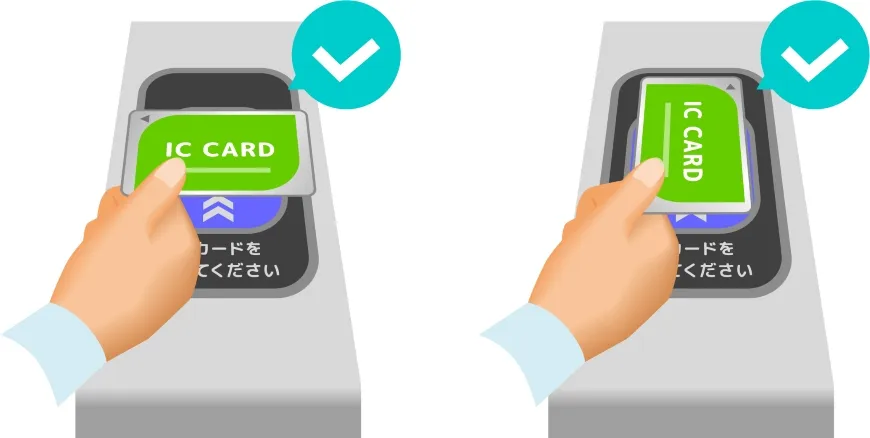
An IC (Integrated Circuit) card is a prepaid smart card that stores monetary value. Instead of buying individual tickets for each train or bus ride, you simply tap your card on the reader at the ticket gate when entering and exiting. The correct fare is automatically deducted. Beyond transport, these cards can also be used as electronic money for purchases at convenience stores, vending machines, lockers, and even some restaurants.
The Major IC Cards & Their Interoperability
While different regions of Japan have their own IC cards, the good news is that most major IC cards are interoperable. This means if you buy a Suica in Tokyo, you can use it to pay for trains and buses in Kyoto, Osaka, Fukuoka, and many other cities across Japan!
The 10 major IC cards that are interoperable are:
- Suica(Tokyo/JR East)
- PASMO(Tokyo/private railways & subways)
- ICOCA(Kansai/JR West)
- TOICA(Nagoya/JR Central)
- PiTaPa(Kansai – generally post-pay, not ideal for tourists)
- Kitaca(Sapporo/JR Hokkaido)
- nimoca(Fukuoka)
- Hayakaken(Fukuoka)
- Sugoca(Fukuoka/JR Kyushu)
- manaca(Nagoya)
For most tourists, Suica, PASMO, or ICOCA are the most commonly encountered and purchased.
Key Features & Functionality
- Tap-and-Go Convenience: Simply touch your card to the designated reader at ticket gates (for trains) or on buses.
- Wide Acceptance: Usable on almost all trains, subways, and buses in major cities across Japan. Also accepted at many convenience stores (7-Eleven, Lawson, FamilyMart), vending machines, coin lockers, and some retail shops/restaurants.
- Rechargeable: Easily add more money to your card at ticket machines in train stations or at convenience store cashiers.
- No Fare Calculation: You don’t need to look up fares or figure out complex route maps. The system handles it automatically.
- Save Time: No more queuing for tickets!
Specific IC Cards for Tourists: Welcome Suica & PASMO Passport
Due to a global chip shortage impacting the production of regular IC cards, JR East and Tokyo Metro/private railways have introduced special IC cards specifically for short-term foreign visitors.
Welcome Suica
- Relevance: Primarily for travelers arriving in Tokyo via Narita (NRT) or Haneda (HND) Airports.
- Pros:
- No Deposit Required: Unlike regular IC cards which require a ¥500 deposit.
- Special Design: Features a unique, attractive red design.
- Easy Purchase:Available at designated JR East Travel Service Centers at NRT/HND and major JR stations in Tokyo.
- Cons:
- Limited Validity: Valid for 28 days from the date of issue. Any remaining balance is not refundable after this period.
- Non-Refundable: The card itself cannot be returned for a refund of the initial purchase amount or any remaining balance (though you can spend the balance down to zero).
- Best For: Short-term visitors (under 28 days) arriving in Tokyo who don’t want to deal with a deposit/refund process.
PASMO Passport
- Relevance: Also primarily for travelers arriving in Tokyo.
- Pros:
- No Deposit Required:
- Similar to Welcome Suica, no ¥500 deposit.
- Features a unique, attractive cherry blossom and sightseeing design.
- Available at designated ticket counters at Narita and Haneda Airports (e.g., Keisei Bus, Skyliner & Keisei Information Center) and major private railway/subway stations in Tokyo.
- Cons:
- Limited Validity: Valid for 28 days from the date of issue. Any remaining balance is not refundable after this period.
- Non-Refundable: The card itself cannot be returned for a refund of the initial purchase amount or any remaining balance.
- Best For: Short-term visitors (under 28 days) arriving in Tokyo who prefer the PASMO network or design, and don’t want a deposit/refund.
Regular Suica / PASMO / ICOCA
- Current Status: Due to the chip shortage, new sales of physical regular Suica and PASMO cards have been suspended indefinitely for now (as of late 2024). ICOCA sales might still be available in the Kansai region, but check locally.
- Pros (if available):
- No Expiry Date: Can be kept indefinitely and used on future trips.
- Refundable Deposit: The ¥500 deposit is refunded upon return of the card (minus a small handling fee if there’s a remaining balance).
- Cons:
- Deposit Required:< ¥500 deposit upfront.
- Refund Process: Requires going to a JR/private railway office in the issuing region (e.g., JR East office for Suica) to get the deposit/balance refunded.
Which One Should You Choose?
Given the current situation (suspension of regular physical card sales), your choice is largely dictated by your arrival point and length of stay:
- Arriving in Tokyo (Narita/Haneda) for a short trip (under 28 days):
- Welcome Suica or PASMO Passport are your primary options. They are specifically designed for tourists and are easily obtainable at the airport.
- Arriving in Tokyo for a longer trip (over 28 days) OR unable to get Welcome Suica/PASMO Passport:
- Mobile Suica (for iPhone) or Mobile PASMO (for Android/iPhone): This is increasingly the best and easiest option for many. See below.
- Arriving in Kansai (Osaka/Kyoto, e.g., Kansai International Airport KIX):
- ICOCA (if physical cards are still available for tourists) or Mobile ICOCA (if available and compatible with your device). If not, consider using a combination of individual tickets and purchasing a Welcome Suica/PASMO Passport upon arrival in Tokyo if your itinerary takes you there.
The Rise of Mobile IC Cards: Mobile Suica & Mobile PASMO
For iPhone users (iPhone 8 and newer, running iOS 13.0 or later) and compatible Android users (Android 7.0 or later with Osaifu-Keitai functionality), Mobile Suica (or Mobile PASMO is the ultimate convenience.
- How it works: You can add a new Suica/PASMO directly to your Apple Wallet (or Google Wallet on Android) or via their dedicated apps.
- Pros:
- No physical card needed: Your phone is your IC card.
- Instant purchase: No need to queue at a counter.
- Top-up from your phone: Recharge directly using a credit card (Visa, Mastercard, Amex, JCB are usually accepted, though some foreign cards might have issues). This is incredibly convenient!
- Never lose it (unless you lose your phone): Tied to your Apple ID/Google account.
- Cons:
- Battery dependent: If your phone battery dies, you can’t use it.
- Credit card compatibility: Some foreign credit cards might occasionally fail to top-up, requiring cash top-ups at stations.
- Recommendation: If your phone is compatible, Mobile Suica or Mobile PASMO is highly recommended as the most hassle-free way to use an IC card in Japan.
How to Purchase & Charge Your IC Card
Purchasing a Physical IC Card (Welcome Suica / PASMO Passport):
- Locate the counter: At Narita or Haneda Airports, head to the JR East Travel Service Center (for Welcome Suica) or the Keisei Bus/Skyliner counters (for PASMO Passport).
- State your request: Ask for a “Welcome Suica” or “PASMO Passport.”
- Load initial balance: You’ll need to pay an initial amount (e.g., ¥1,000, ¥2,000, or more). There is no deposit for these tourist cards.
- Receive card: You’ll get your ready-to-use card.
Charging (Top-up) a Physical IC Card:
- Ticket Machines:
- Find a ticket machine at any train or subway station.
- Look for a button that says “Charge” (チャージ chaaji) or “IC Card.”
- Insert your IC card.
- Select the amount you want to charge (e.g., ¥1,000, ¥2,000, ¥5,000).
- Insert cash (most machines accept ¥1,000, ¥5,000, ¥10,000 notes and coins).
- Your card will be returned, topped up.
- Convenience Stores:
- Go to the cashier at any 7-Eleven, Lawson, or FamilyMart.
- Tell the cashier “IC card charge” (アイシーカード チャージ aishii kaado chaaji) or “Suica charge” (スイカ チャージ suika chaaji).
- Tap your card on their reader when instructed.
Using Mobile Suica/PASMO:
- For Suica, download the “SuicaEng” app. For PASMO, download the “PASMO” app. (Or simply add new card directly to Apple Wallet).
- Add Card: Follow the in-app instructions to add a new Suica/PASMO.
- Top-up: Use a compatible credit card within the app or Apple/Google Wallet to add funds. You can also top up with cash at station ticket machines or convenience stores.
- Tap to Go: Use your phone just like a physical card at ticket gates and payment terminals.
Pros & Cons of Using IC Cards
Pros:
- Ultimate Convenience: Tap and go, no need for exact change or ticket purchases.
- Time-Saving: Speeds up entry and exit from stations.
- Usable for transport and many small purchases.
- Fare Accuracy: Automatically deducts the correct fare, preventing overpayment.
- Interoperable: Use one card across most major cities in Japan.
Cons:
- Not for Shinkansen (usually): While some Shinkansen systems allow IC card usage with prior registration (e.g., Smart EX), they are generally not used for express trains or bullet trains requiring seat reservations. You’ll need separate tickets for these.
- Non-Refundable Balance (for tourist cards): Welcome Suica and PASMO Passport balances are not refunded.
- Deposit (for regular cards, if available): A small initial deposit is required.
- Limited Top-up Options (for some foreign cards): Occasionally, foreign credit cards might not work for app-based top-ups, requiring cash top-ups.
Final Thoughts & Tips
- Get one upon arrival: Make it one of the first things you do at the airport.
- Keep it charged: Always maintain a sufficient balance to avoid delays.
- Combine with JR Pass: An IC card is still incredibly useful even if you have a Japan Rail Pass, as the JR Pass doesn’t cover non-JR subways, private lines, or buses in many cities.
- Download offline maps: Google Maps works best with real-time data, but having offline maps as a backup is always smart.
An IC card is an absolute game-changer for stress-free travel in Japan. By choosing the right card for your trip and mastering its use, you’ll navigate Japan like a seasoned pro, leaving more time to enjoy its incredible sights and sounds!